If you’re like me, you generate a lot of markdown files with your agents. Maybe they’re things like research documents, or a daily docket. They might be communication devices, like a plan committed to disk, or a journal you share. Maybe they’re memory files your agent reads at the start of every session, or handoff notes from one session to the next.
Markdown files are the core of my daily workflow, the raw material of everything I work on. They’re portable, legible, and easy to back up. There’s a lot to recommend them.
Meanwhile, I build a ton of apps just for myself, and most of them need a database. You can’t open a database and read it like a text file. My agents have to poke and prod at the database before they can read or write anything, and so do I (or ask my agent to do it for me).
And since the data usually starts as markdown, every app needs a script to get data into the app and keep it in sync. If I delete a row in the app, which copy is right? Then I need another script to export the data for the inevitable day I stop using the vibe-coded app (but still want to keep my data).
I built a tool, dirsql, that lets you query your files with SQL. It’s like React for data, a declarative way of deriving a database from your files as the source of truth. That means that if you add or delete a file on disk, the application’s rows update automatically. And if you stop using the app there’s nothing to export, because your data are your files. You and your agents collaborate on plain text files, but you still build the kinds of dynamic software we know and love without the backend machinery.
I’ve been using it in a lot of my personal software and I think it might be helpful for yours too.
What Can You Do When Your Filesystem is a Database?
I think the best way to demonstrate why it’s useful is showing how I use dirsql in my own software. There’s also plenty of docs if you’d prefer a more technical introduction. 1
Let’s get started.
You Can SELECT * FROM './'
SQL via dirsql lets you find files on your filesystem.
Below I’ll provide both the dirsql command and the native equivalent. Native tools are easier to read for basic commands. The more complicated you get, the more SQL shows its worth.
Start with a basic list:
uvx dirsql "SELECT * FROM './'"
ls
path             basename         dir  ext   size   mtime       ctime
---------------  ---------------  ---  ----  -----  ----------  ----------
AGENTS.md        AGENTS.md             md    3941   1791240287  1791281924
ARCHITECTURE.md  ARCHITECTURE.md       md    23080  1791199872  1791281924
CHANGELOG.md     CHANGELOG.md          md    67821  1784394668  1791281924
Cargo.lock       Cargo.lock            lock  91276  1791224560  1791281924
You also can easily recurse with ./**:
uvx dirsql "
SELECT * FROM './**'"
find . -type f -not -path '*/.*'
path                           basename         dir                  ext  size   mtime       ctime
-----------------------------  ---------------  -------------------  ---  -----  ----------  ----------
AGENTS.md                      AGENTS.md                             md   3941   1791240287  1791281924
ARCHITECTURE.md                ARCHITECTURE.md                       md   23080  1791199872  1791281924
…
agents/environments/local.md   local.md         agents/environments  md   7450   1789758352  1791281924
agents/environments/remote.md  remote.md        agents/environments  md   5037   1791224560  1791281924
…
Re-order, limit, and filter in a single SQL command:
uvx dirsql "
SELECT path FROM './**'
WHERE ext = 'md'
ORDER BY mtime DESC
LIMIT 5"
ls -t $(find . -name '*.md' -not -path '*/.*') | head -5
path
-----------------------------------
PARITY.md
README.md
agents/reference/pr-monitor.md
agents/reference/session-handoff.md
docs/reference/cli.md
Pick columns and compute new ones:
uvx dirsql "
SELECT path, size / 1024 AS kb,
       date(mtime, 'unixepoch') AS day
FROM './**'
WHERE ext = 'md'
ORDER BY size DESC
LIMIT 5"
find . -name '*.md' -not -path '*/.*' \
  -printf '%s %TF %P\n' \
  | sort -rn \
  | head -5 \
  | awk '{ print $3, int($1 / 1024), $2 }'
path                                     kb  day
---------------------------------------  --  ----------
MIGRATIONS.md                            74  2026-09-02
CHANGELOG.md                             66  2026-07-18
PARITY.md                                49  2026-10-06
notes/recall-skill-review-2026-09-25.md  35  2026-09-28
agents/reference/testing-gates.md        32  2026-10-05
Group and count:
uvx dirsql "
SELECT ext,
       count(*) AS files,
       sum(size) / 1024 AS kb
FROM './**'
GROUP BY ext
ORDER BY files DESC
LIMIT 5"
find . -type f -not -path '*/.*' \
  -printf '%s %f\n' \
  | awk '{
      n = split($2, part, ".")
      ext = n > 1 ? part[n] : "NULL"
      files[ext]++
      kb[ext] += $1
    }
    END {
      for (e in files)
        print e, files[e], int(kb[e] / 1024)
    }' \
  | sort -k2rn \
  | head -5
ext   files  kb
----  -----  ----
md    367    907
py    340    669
json  188    40
rs    104    1539
ts    77     259
And you can stitch several queries into one list:
uvx dirsql "
SELECT 'files' AS stat, count(*) AS value
  FROM './**'
UNION ALL
SELECT 'markdown', count(*)
  FROM './**' WHERE ext = 'md'
UNION ALL
SELECT 'kb', sum(size) / 1024
  FROM './**'
UNION ALL
SELECT 'newest', date(max(mtime), 'unixepoch')
  FROM './**'"
find . -type f -not -path '*/.*' \
  -printf '%s\t%T@\t%P\n' \
  | awk -F'\t' '{
      files++; kb += $1
      if ($3 ~ /\.md$/) md++
      if ($2 > newest) newest = $2
    }
    END {
      print "files", files
      print "markdown", md
      print "kb", int(kb / 1024)
      print "newest", strftime("%Y-%m-%d", newest, 1)
    }'
stat      value
--------  ----------
files     1106
markdown  367
kb        3728
newest    2026-10-06
Where SQL really shines is combining rules or filtering on columns, which makes agents’ behavior more readable and precise (with fewer tokens, too!)
A specific example: I run a daily “dossier generation” script. SQL gives me exact control over the list of files that gets passed to my agent. Otherwise the agent goes poking around on its own with a dozen non-deterministic tool calls, which costs tokens and time2:
uvx dirsql "
SELECT 1 AS rank, 'standing' AS kind, path, date(mtime, 'unixepoch') AS modified
FROM './planner/background/*.md'
UNION ALL
SELECT 2, 'daily', path, date(mtime, 'unixepoch')
FROM './journal/*.md'
WHERE mtime > unixepoch('now', '-3 days')
UNION ALL
SELECT 3, 'recent', path, date(mtime, 'unixepoch')
FROM './**'
WHERE ext = 'md'
  AND mtime > unixepoch('now', '-7 days')
  AND path NOT LIKE 'journal/%'
  AND path NOT LIKE 'planner/background/%'
ORDER BY rank, modified DESC"
rank  kind      path                                       modified
----  --------  -----------------------------------------  ----------
1     standing  planner/background/projects.md             2026-09-10
1     standing  planner/background/profile.md              2026-08-13
2     daily     journal/2026-10-01.md                      2026-10-01
2     daily     journal/2026-09-30.md                      2026-09-30
2     daily     journal/2026-09-29.md                      2026-09-30
3     recent    planner/dockets/2026-09-30.md              2026-09-30
3     recent    projects/dirsql/notes/launch-checklist.md  2026-09-29
3     recent    projects/blog/drafts/dirsql-outline.md     2026-09-28
3     recent    reading/sqlite-virtual-tables.md           2026-09-26
Your Text Files Can Be Your Database
I particularly like this use case.
dirsql can turn your file content into a database.
Let’s say you keep a journal, or a lab notebook, or some sort of file with entries divided by dates:
# Journal of my time in the Antarctic

## 2026-09-22

Dang, saw some really cool Penguins today

## 2026-09-25

More penguins! How many penguins can one man see?

## 2026-09-26

Saw a walrus today.

## 2026-09-27

An albatross circled the ship for an hour.

## 2026-09-28

Ran out of coffee at the station. Morale is low.
It sure would be nice to see my latest entries first! Let’s do it:
uvx dirsql \
"SELECT date, content FROM './journal.md' ORDER BY date DESC" \
  --on-file 'python3 parse.py'
There’s a new flag here, --on-file. It specifies a command that turns file contents into rows. In Python parse.py might look like:
import json, sys

for path in sys.argv[1:]:
    for entry in open(path).read().split("\n## ")[1:]:
        date, content = entry.split("\n", 1)
        print(json.dumps({"date": date, "content": content.strip()}))
But it doesn’t have to be Python, you can use any language for parsing that your system supports:
uvx dirsql "SELECT date, content FROM './journal.md'
ORDER BY date DESC" \
  --on-file "jq -Rsc '
    [splits(\"\n## \")][1:]
    | map(split(\"\n\n\"))
    | map({date: .[0], content: (.[1] | rtrimstr(\"\n\"))})
    | .[]
  '"
Which produces:
date        content
----------  -------------------------------------------------
2026-09-28  Ran out of coffee at the station. Morale is low.
2026-09-27  An albatross circled the ship for an hour.
2026-09-26  Saw a walrus today.
2026-09-25  More penguins! How many penguins can one man see?
2026-09-22  Dang, saw some really cool Penguins today
And of course, we can use native SQL. This notebook sure talks a lot about penguins; what entries don’t mention penguins?
uvx dirsql "SELECT date, content FROM './journal.md'
WHERE content NOT LIKE '%penguin%'" \
  --on-file 'python3 parse.py'
date        content
----------  -------------------------------------------------
2026-09-26  Saw a walrus today.
2026-09-27  An albatross circled the ship for an hour.
2026-09-28  Ran out of coffee at the station. Morale is low.
You Can Search By Meaning
Because we’re using SQL (specifically, SQLite), we have access to the entire SQLite ecosystem. A cool thing we can do is use vector embeddings.
Vector embeddings are a way to represent text by meaning. Instead of searching for something by keyword (give me all entries talking about penguins), you can search by intent (give me all entries about polar birds).
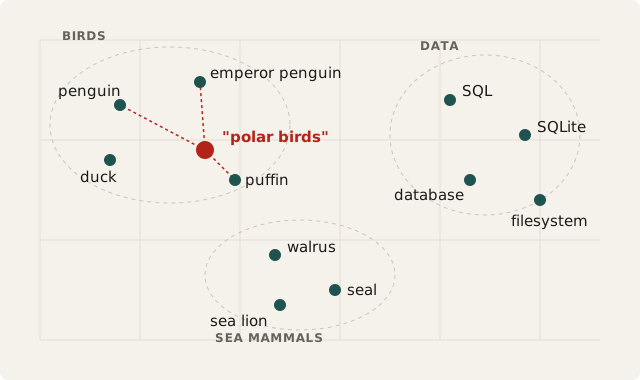
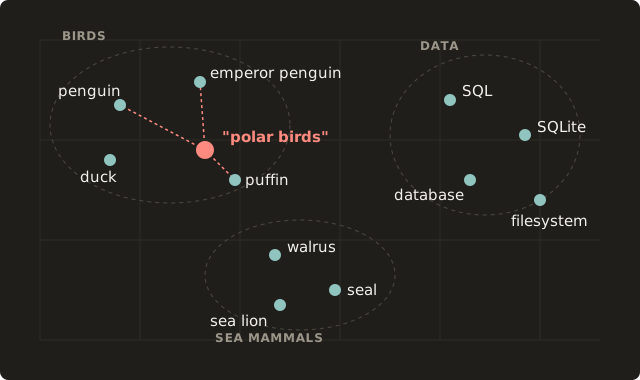
To support vector embeddings, we need to include a plugin (by the way, dirsql supports plugins 3).
Let’s reuse our journal from above. What entries discuss polar birds?
uvx --with dirsql-plugin-embeddings dirsql "
SELECT
  round(vec_distance_cosine(
    embed(content),
    embed('polar birds')
  ), 3) AS distance,
  date,
  content
FROM './journal.md'
ORDER BY distance" --on-file 'python3 parse.py'
distance  date        content
--------  ----------  -------------------------------------------------
0.637     2026-09-25  More penguins! How many penguins can one man see?
0.766     2026-09-22  Dang, saw some really cool Penguins today
0.789     2026-09-27  An albatross circled the ship for an hour.
0.821     2026-09-26  Saw a walrus today.
1.031     2026-09-28  Ran out of coffee at the station. Morale is low.
This is a contrived example so let’s use something more concrete.
arXiv hosts lots of academic papers, and I have a nightly script that pulls all “machine learning” paper abstracts to disk. Using dirsql I can search all papers by meaning, which makes it much easier to find the relevant and interesting papers.
For example, we can search for how to turn a selfie into a 3D face:
uvx --with dirsql-plugin-embeddings dirsql "
SELECT
  round(vec_distance_cosine(
    embed(content ->> 'abstract'),
    embed('turning a selfie into a 3D face')
  ), 3) AS distance,
  substr(content ->> 'title', 1, 58) AS title
FROM './papers/*/metadata.json'
ORDER BY distance
LIMIT 5"
distance  title
--------  ----------------------------------------------------------
0.358     FaceGPT: Self-supervised Learning to Chat about 3D Human F
0.413     SARS: A Novel Face and Body Shape and Appearance Aware 3D
0.416     3DRealHead: Few-Shot Detailed Head Avatar
0.436     Generative Landmarks Guided Eyeglasses Removal 3D Face Rec
0.439     Generative Face Parsing Map Guided 3D Face Reconstruction
None of the results include selfie. Searching by keyword would have skipped them all.
You Can Query Your Claude Code Transcripts
Something I use every day is my own personal transcript database that I get largely for free without an ingest pipeline.
Claude Code stores all its transcripts in a local directory, ~/.claude. Let’s select from that and see what it looks like:
uvx dirsql "
SELECT * FROM '~/.claude/projects/*/*.jsonl'
ORDER BY mtime DESC
LIMIT 5"
path                                                           basename                                    dir                                                   ext    size     mtime       ctime
-------------------------------------------------------------  ------------------------------------------  ----------------------------------------------------  -----  -------  ----------  ----------
/home/you/.claude/projects/-home-you-code-recipe-app/3f9c2a7…  3f9c2a71-8e4b-4d2a-9c61-7b5e0d2f8a13.jsonl  /home/you/.claude/projects/-home-you-code-recipe-app  jsonl  569836   1790958581  1790958384
/home/you/.claude/projects/-home-you-code-recipe-app/a81d4e0…  a81d4e09-2c7f-4b3e-8f15-6e9a3c7b2d40.jsonl  /home/you/.claude/projects/-home-you-code-recipe-app  jsonl  5840861  1790958557  1790937682
/home/you/.claude/projects/-home-you-notes/c2e7b5f3-91a4-4f8…  c2e7b5f3-91a4-4f8d-b026-3d8e1f6a9c57.jsonl  /home/you/.claude/projects/-home-you-notes            jsonl  745711   1790958488  1790898538
/home/you/.claude/projects/-home-you-code-budget-cli/7b40f8d…  7b40f8d2-5e3c-4a91-8d7e-0f2c6b9e4a18.jsonl  /home/you/.claude/projects/-home-you-code-budget-cli  jsonl  3368883  1790958469  1790865520
/home/you/.claude/projects/-home-you-notes/e95a1c3d-4f07-4b6…  e95a1c3d-4f07-4b6e-a2d9-8c1f5e7b3a62.jsonl  /home/you/.claude/projects/-home-you-notes            jsonl  716330   1790958384  1790953793
Claude stores those per project, with session IDs. It also stores memories and subagent transcripts in nested folders. Let’s adjust our query to show that:
uvx dirsql "
SELECT
  CASE
    WHEN path LIKE '%/memory/%' THEN 'memory'
    WHEN path LIKE '%/subagents/%' THEN 'subagent transcript'
    ELSE 'session transcript'
  END AS kind,
  count(*) AS files
FROM '~/.claude/projects/**'
WHERE ext = 'jsonl' OR path LIKE '%/memory/%'
GROUP BY kind
ORDER BY files DESC"
kind                 files
-------------------  -----
subagent transcript  1342
memory               490
session transcript   405
jsonl files store each turn of a conversation as a line of JSON. Let’s add a parser to break those apart:
uvx dirsql "
SELECT
  cwd AS project,
  sessionId AS session,
  type AS role,
  CASE json_type(message, '$.content')
    WHEN 'text' THEN message ->> '$.content'
    ELSE message ->> '$.content[0].text'
  END AS text,
  timestamp
FROM '~/.claude/projects/*/*.jsonl'
WHERE text IS NOT NULL
ORDER BY timestamp DESC
LIMIT 5" --on-file 'cat'
project                    session                               role       text                                                       timestamp
-------------------------  ------------------------------------  ---------  ---------------------------------------------------------  ------------------------
/home/you/code/recipe-app  3f9c2a71-8e4b-4d2a-9c61-7b5e0d2f8a13  assistant  Let me look at the save handler.                           2026-10-02T16:29:36.214Z
/home/you/code/recipe-app  3f9c2a71-8e4b-4d2a-9c61-7b5e0d2f8a13  user       Why does the ingredient list reorder itself on save?       2026-10-02T16:29:30.871Z
/home/you/code/recipe-app  3f9c2a71-8e4b-4d2a-9c61-7b5e0d2f8a13  assistant  Done: the recipe page has an Export shopping list button.  2026-10-02T16:28:40.502Z
/home/you/code/recipe-app  3f9c2a71-8e4b-4d2a-9c61-7b5e0d2f8a13  assistant  I'll add an export button below the ingredient list.       2026-10-02T16:27:20.093Z
/home/you/code/recipe-app  3f9c2a71-8e4b-4d2a-9c61-7b5e0d2f8a13  user       Add a shopping-list export to the recipe page              2026-10-02T16:27:12.647Z
Ideally we’d have a normalized layout, with messages and sessions tables. We can do that! We need a config file:
[[table]]
name    = "sessions"
glob    = "*/*.jsonl"
ddl     = "CREATE TABLE sessions (session TEXT, project TEXT)"
on-file = '''
jq -c -s '
  map(select(.sessionId))
  | group_by(.sessionId)
  | map({
      session: .[0].sessionId,
      project: (map(.cwd | values) | first)
    })
  | .[]
'
'''

[[table]]
name    = "messages"
glob    = "*/*.jsonl"
ddl     = "CREATE TABLE messages (session TEXT, role TEXT, text TEXT, timestamp TEXT)"
on-file = '''
jq -c '
  {
    session: .sessionId,
    role: .type,
    text: (.message.content | if type == "string" then . else .[0]?.text end),
    timestamp
  }
  | select(.text)
'
'''
So now our query becomes:
cd ~/.claude/projects
uvx dirsql "
SELECT s.project, m.session, m.role, m.text, m.timestamp
FROM messages m
JOIN sessions s ON s.session = m.session
ORDER BY m.timestamp DESC
LIMIT 5" -c ./.dirsql.toml
project                    session                               role       text                                                       timestamp
-------------------------  ------------------------------------  ---------  ---------------------------------------------------------  ------------------------
/home/you/code/recipe-app  3f9c2a71-8e4b-4d2a-9c61-7b5e0d2f8a13  assistant  Let me look at the save handler.                           2026-10-02T16:29:36.214Z
/home/you/code/recipe-app  3f9c2a71-8e4b-4d2a-9c61-7b5e0d2f8a13  user       Why does the ingredient list reorder itself on save?       2026-10-02T16:29:30.871Z
/home/you/code/recipe-app  3f9c2a71-8e4b-4d2a-9c61-7b5e0d2f8a13  assistant  Done: the recipe page has an Export shopping list button.  2026-10-02T16:28:40.502Z
/home/you/code/recipe-app  3f9c2a71-8e4b-4d2a-9c61-7b5e0d2f8a13  assistant  I'll add an export button below the ingredient list.       2026-10-02T16:27:20.093Z
/home/you/code/recipe-app  3f9c2a71-8e4b-4d2a-9c61-7b5e0d2f8a13  user       Add a shopping-list export to the recipe page              2026-10-02T16:27:12.647Z
You can also run dirsql as a server with:
cd ~/.claude/projects
uvx dirsql server -c ./.dirsql.toml
> Running at localhost:7117
And then you can run POST requests against it. You can tell your agent to build you a frontend on top of this that lets you select, reorder, search semantically; whatever you want. dirsql doesn’t give you the frontend 4, but it gives you the backend for free!
Your Files Remain The Same
Ultimately I’m allergic to lock-in.
And that’s really been the trend of my life these last few years, trying to avoid lock-in of my data whenever I can. I moved from Gmail to my own email domain and from Evernote to Obsidian. I don’t like my data stuck in a walled garden and that applies as much to my own software as to somebody else’s.
With dirsql, my files stay mine. My journal remains a markdown file, the arXiv papers JSON on disk, Claude transcripts JSONL in my ~/.claude folder, all while the agents keep working, blissfully unaware there’s a read-only layer on top exposing them via SQL. And when I inevitably decide to throw away my random weekend vibe-coded app, it doesn’t affect my data because there’s nothing to export.
Check out dirsql in the docs, or just try running it in a directory with:
uvx dirsql "SELECT * FROM './'"
or
npx -y dirsql "SELECT * FROM './'"
If you use it and it’s helpful to you (or if it’s not!), please let me know.
Happy SQL-ing!
dirsqlis available on PyPI, npm, and Cargo, and can be used without installing viauvxornpx; Getting Started instructions here. ↩︎When I presented
dirsqlat a recent AI Tinkerers event, somebody asked whether givingdirsqlto an agent changes its behavior. I don’t have a good answer yet. Agents rarely reach for it on their own. I have to prompt them. But once it’s invoked via skill, they use it well. ↩︎This plugin pulls in a vector embedding model automatically. You can use a different model too. ↩︎
Maybe it should? Actually I like this idea so I filed it as an issue. ↩︎